
If you've ever kicked off a Nextflow pipeline, stepped away for fifteen minutes, and come back to find your jobs exactly where you’ve left them, this blog post is for you.
Running Bioinformatics workflows at scale on AWS Batch is powerful, but when something goes wrong, the failure modes are not always self-evident. A job stuck in RUNNABLE is a classic example: it surfaces almost no diagnostic context, and the list of underlying causes can be longer than you’d expect.
In this post, we'll walk through what RUNNABLE actually means, cover the most common causes of job stalling at this stage, and lay out a systematic approach to diagnosing each one, including several Nextflow-patterns that are easy to miss.
Understanding the AWS Batch Job Lifecycle
Before diving into troubleshooting, it helps to know what "normal" looks like. When you create a Compute Environment on Seqera using Batch Forge, the following infrastructure is provisioned once:
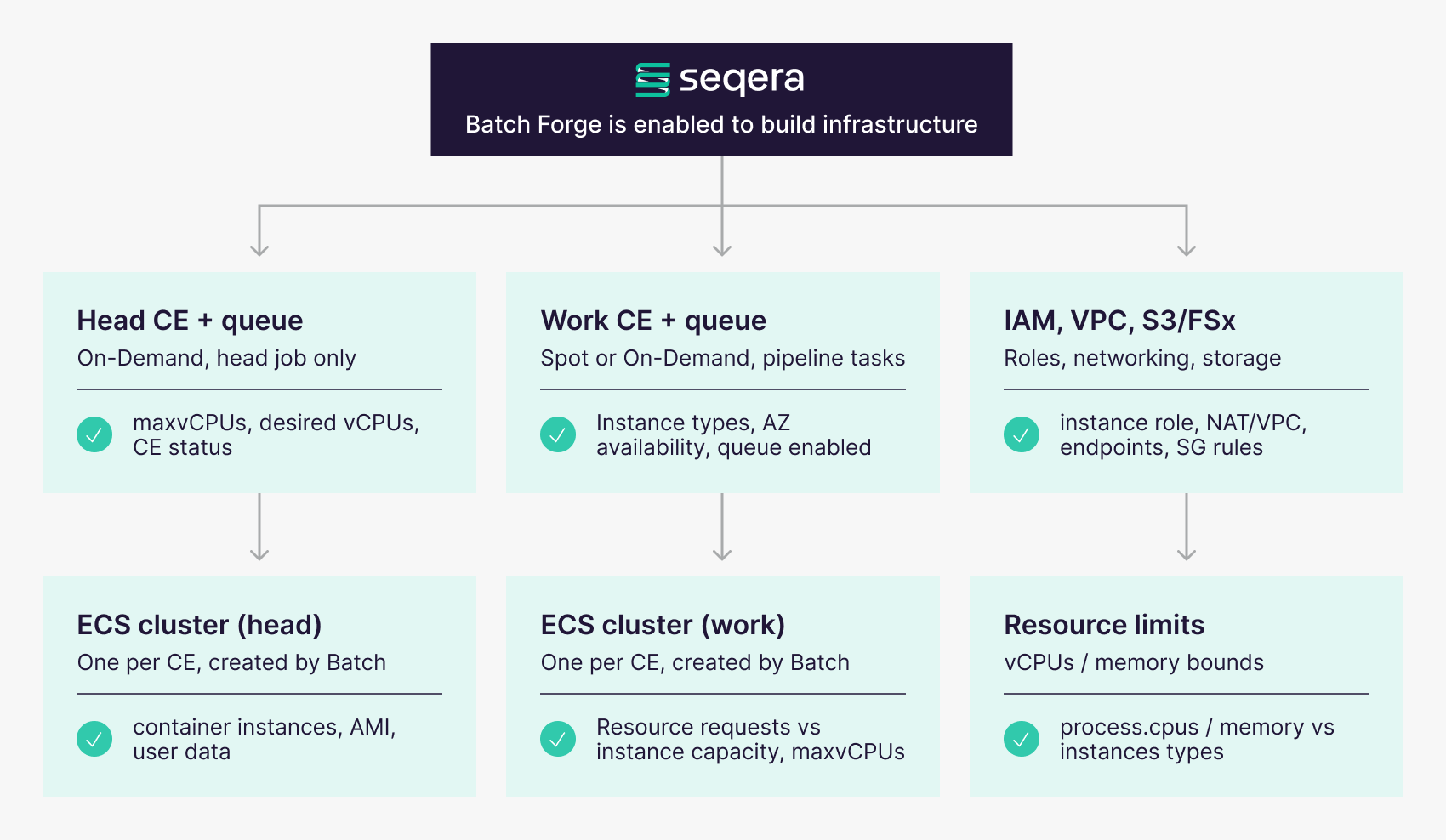
After the infrastructure is provisioned, jobs move through the following states when submitted to AWS: SUBMITTED, PENDING, RUNNABLE, STARTING, RUNNING, and SUCCEEDED or FAILED. A simplified version of the state transitions (minus PENDING) is shown in the figure below.
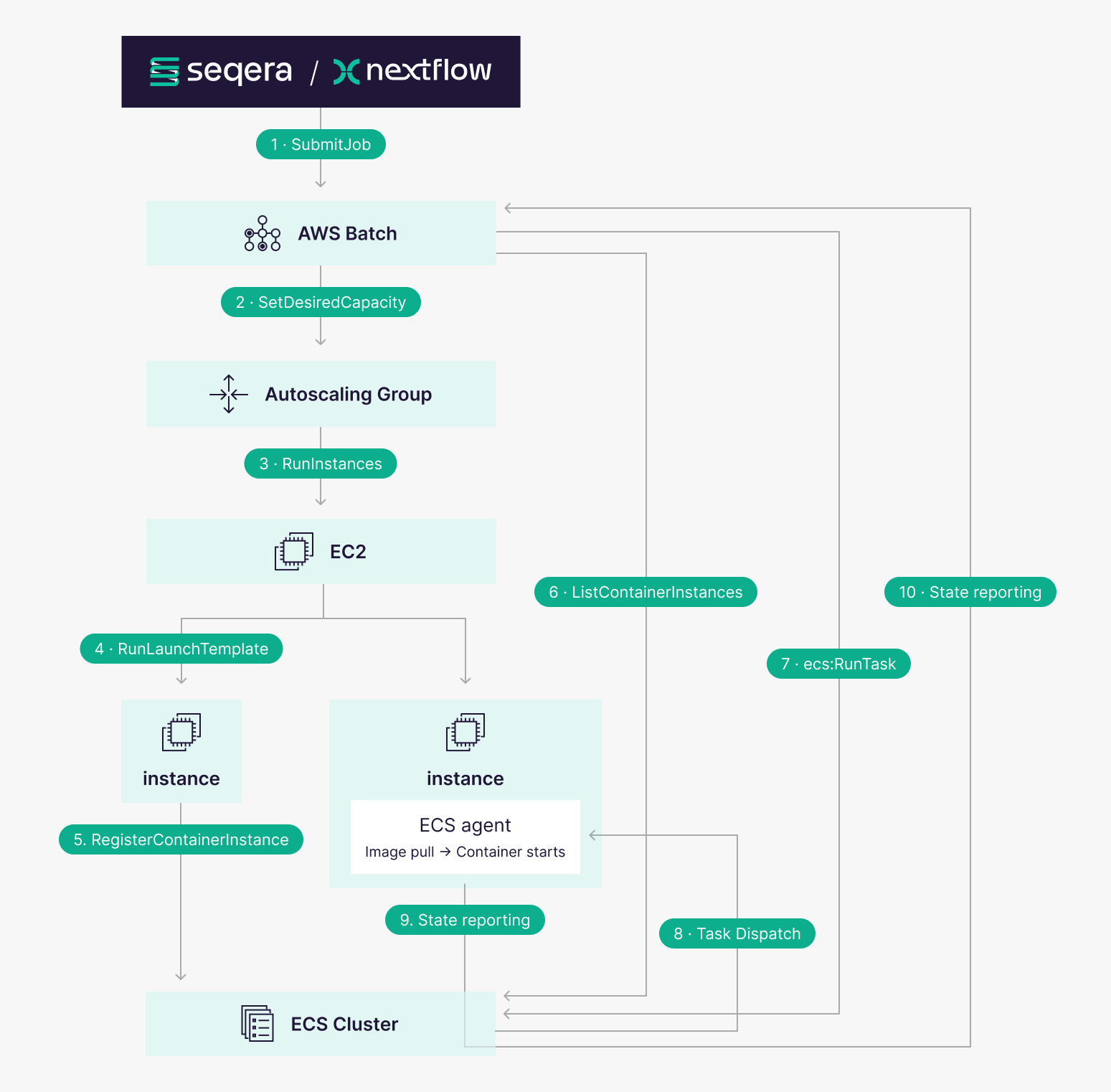
Here's What Happens Step by Step:
- The flow begins when a job is submitted to AWS Batch, from either Platform (the Nextflow head job) or from Nextflow itself (a workflow task). The job moves quickly to the RUNNABLE state. From there, the mechanics are all internal to AWS.
- The AWS Batch Compute Environment attempts to scale out the compute power to execute the job, setting a new desired capacity in the autoscaler group (ASG).
- Once the autoscaler group receives the signal, and the ASG has the capacity to launch an EC2 instance that meets the requirements, the instance launches.
- The instance boots and the launch template executes.
- The launch template includes the ECS agent, which registers with the ECS cluster once running.
- The AWS Batch Compute Environment polls the ECS cluster intermittently and detects the new instance joining the cluster.
- AWS Batch submits the task to the ECS cluster for execution. The job transitions from
RUNNABLEtoSTARTING. - The ECS cluster dispatches the task to the instance. The container image is pulled and the container starts.
- The ECS agent reports the updated state back to the ECS cluster.
- The ECS cluster relays the state to Batch, and the job moves from STARTING to RUNNING.
A job stuck in RUNNABLE is sitting at the front of the queue: fully evaluated, dependencies resolved, and cleared for execution by AWS Batch. The problem remains that no Compute Environment is able to accept this job yet. The question is: why not?
Common Causes of Jobs Stuck in RUNNABLE
Compute Environment Misconfiguration
This is the most common culprit, and the first place to look.
- →Max vCPUs set too low or to 0: If
maxvCpusis 0, or equal tominvCpuswith resources fully consumed, jobs will queue indefinitely. - →Desired vCPUs not increasing: If desired vCPUs stays at 0 with jobs queued in your AWS Console, Batch isn’t attempting to provision.
- →Instance types too restrictive: If specific instance types are defined and none are available in the selected AZs, jobs will remain in RUNNABLE.
- →Compute environment is INVALID or DISABLED: Jobs submitted to an INVALID Compute Environment will queue forever. Check the
statusReasonfield for the specific error. Similarly, a disabled job queue can still accept submissions but will never dispatch them.
Misconfigured Launch Template or AMI
If instances are launching but not registering with the ECS cluster, jobs will never get placed. Check the underlying ECS cluster for container instance registrations, and review your EC2 ASG activity for launch failures.
IAM and Permissions Issues
Missing IAM permissions are a common cause of instances that launch but never join the cluster, which from the outside looks identical to a capacity problem. The following are the three core roles used by Nextflow when submitting a job to AWS Batch:
| Role | Purpose | Required Policy |
|---|---|---|
| Batch Service Role | Allows AWS Batch to manage Fargate tasks and ECS resources on your behalf | AWSBatchServiceRole |
| Job Execution Role | Used by ECS to pull container images from ECR and push logs to CloudWatch BEFORE your container starts | AmazonECSTaskExecutionRole |
| Job Role (Optional) | IAM permissions WITHIN uour running container (e.g., S3 access, Secrets Manager) | Custom policy per workload |
Networking and VPC Configuration
Jobs stuck in RUNNABLE can often mean instances can’t reach the ECS control plane. Verify that your subnets have a route to the internet, that required VPC endpoints for cloud resources (ECS, ECR, S3, CloudWatch) in place for private networks, and that outbound security group rules allow ECS agent communication and ECR image pulls.
Resource Requests Exceeding Capacity
If a Nextflow process requests more vCPUs or memory than any available instance type can provide, or more than your Compute Environment's maxvCpus allows, it will stay RUNNABLE indefinitely. This is easy to miss when process.cpus and process.memory have grown over time without a corresponding update to the Compute Environment configuration.
Conclusion
Most RUNNABLE issues trace back to Compute Environment scaling, IAM permissions, networking, or resource constraints. Working through each systematically by checking desired vCPUs, instance role policies, and subnet routing will get you to the root cause faster. It’s also worth validating that the values set for process.cpus and process.memory fall within what your selected instance type(s) can satisfy, and that your job queue is active and correctly attached to a valid Compute Environment.
Small misconfigurations at the infrastructure level have a way of surfacing only once a pipeline is already running, so a pre-flight check against the AWS Batch console before submitting jobs at scale is time well spent.
If you're running Nextflow workflows through Seqera, Batch Forge handles much of this configuration automatically. For more detail, check out the Seqera documentation and the AWS Batch Troubleshooting Guide.