
Bench scientists can now launch and track Nextflow pipelines, investigate results, and spin up interactive analysis environments on Seqera Platform, all without leaving Benchling. A pipeline starts from the same Benchling entry that holds the samples, and the run record comes back to that entry when it finishes. The integration pairs Benchling AI Connectors with the Seqera MCP, and every action runs under the authenticated user's existing Seqera permissions. In this blog post, we cover how the integration bridges the gap between the wet-lab and the dry-lab: how it works, what you can do with it today, and how to set it up.
The Silo Problem
Bioinformatics is a critical piece of the R&D knowledge graph, but has historically lived in a silo, disconnected from the wet-lab data collection that provides critical context. That context is what makes a result useful. Knowing where the sample origin, the analysis steps, and scientists involved enriches raw output with actionable metadata. When that samples’ journey cannot be traced from end to end, the final result loses its value.
For bioinformaticians, the contextual gap is exemplified by authorless samplesheets distributed via email, experimental parameters reconstructed post factum, and results that no longer track back to the samples that produced them. For bench scientists, it commonly means waiting on a colleague in another team to launch, validate, or explain a run.
Two Platforms, One Scientific Record
Benchling's goal is AI for every scientist and breakthroughs for all. It connects wet-lab and dry-lab data on one secure platform, with agents that automate lab toil. Its AI Connectors framework connects tools such as Snowflake, Notion, and Seqera, so scientists instantly get the data they need without ever leaving Benchling.
Seqera Platform is the intelligent engine for life sciences, developed by the creators of Nextflow. Nextflow was built to make scientific analysis accessible and reproducible. Seqera, the enterprise platform for scalable bioinformatics, extends this analysis suite across the full scientific lifecycle, bringing together data, pipelines, compute, interactive analysis, and AI in one place.
Put the two side-by-side and the complementary fit is clear. Benchling stores the raw samples, the laboratory entries, and the people. Seqera Platform stores the Nextflow pipelines, provisions and manages the scalable compute resources, and the launched runs. The integration seamlessly connects them.
How Seqera Integrates with Benchling
With Benchling AI Connectors and the Seqera MCP, wet-lab bench scientists can trigger processes in Seqera Platform from within Benchling. Benchling’s AI Connectors extend Benchling’s native AI by connecting it to the diverse data sources and applications your team already uses. They come in three parts:
- →MCP Directory. A catalog of on-demand, ready-to-use connectors. Browse and activate integrations from a growing list of scientific and enterprise applications.
- →MCP Client. Work across applications in a single place. The authenticated client pulls externally sourced data directly into Benchling, so researchers get the context they need without leaving their familiar interface.
- →MCP Server. Make Benchling AI available to other AI agents. External AI tools, such as Claude, ChatGPT, or your own custom environment, can query Benchling data directly and return structured, meaningful results.
Two halves of one connector
A connector lets the Benchling assistant operate within another system. For Seqera, the connector has two halves:
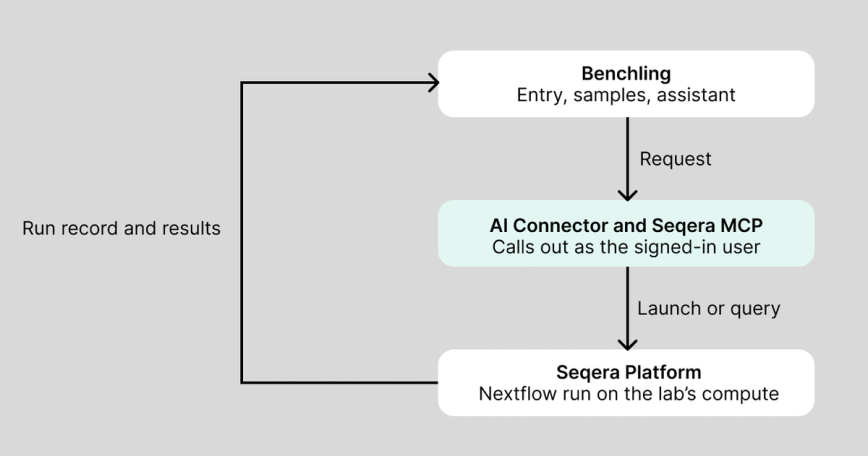
- →Benchling AI Connectors is the toolkit that lets the Benchling assistant call an external system, under the permissions the user already has.
- →Seqera MCP describes what the operations Seqera Platform can execute, allowing the assistant to create datasets, add and launch Nextflow pipeline runs, read pipeline run status, and launch interactive Studios for result analysis.
A scientist submits their natural language bioinformatics prompt in Benchling’s AI chat interface. The connector interprets the commands, securely calling the Seqera MCP with the user's credentials. Seqera Platform launches the pipeline on the lab's already configured compute, and the run, its customized parameters, and its outputs return to the entry.
What you can do today
With the connector enabled, a bench scientist can do four things from within Benchling, creating a virtuous feedback loop for continuous experimental analysis:
- Create datasets. Build a pipeline input dataset in Seqera Platform from data already held in the Benchling Registry or Electronic Lab Notebook (ELN).
- Launch a pipeline. Add and start a Nextflow run on Seqera Platform from the entry that holds the samples, with the parameters already configured, or defined at launch time.
- Track execution. Ask for the state of a Nextflow run, observe the step it’s on, and analyse why an individual task failed.
- Start an analysis. Spin up an interactive Studio on the pipeline results to keep investigating, without moving files anywhere.
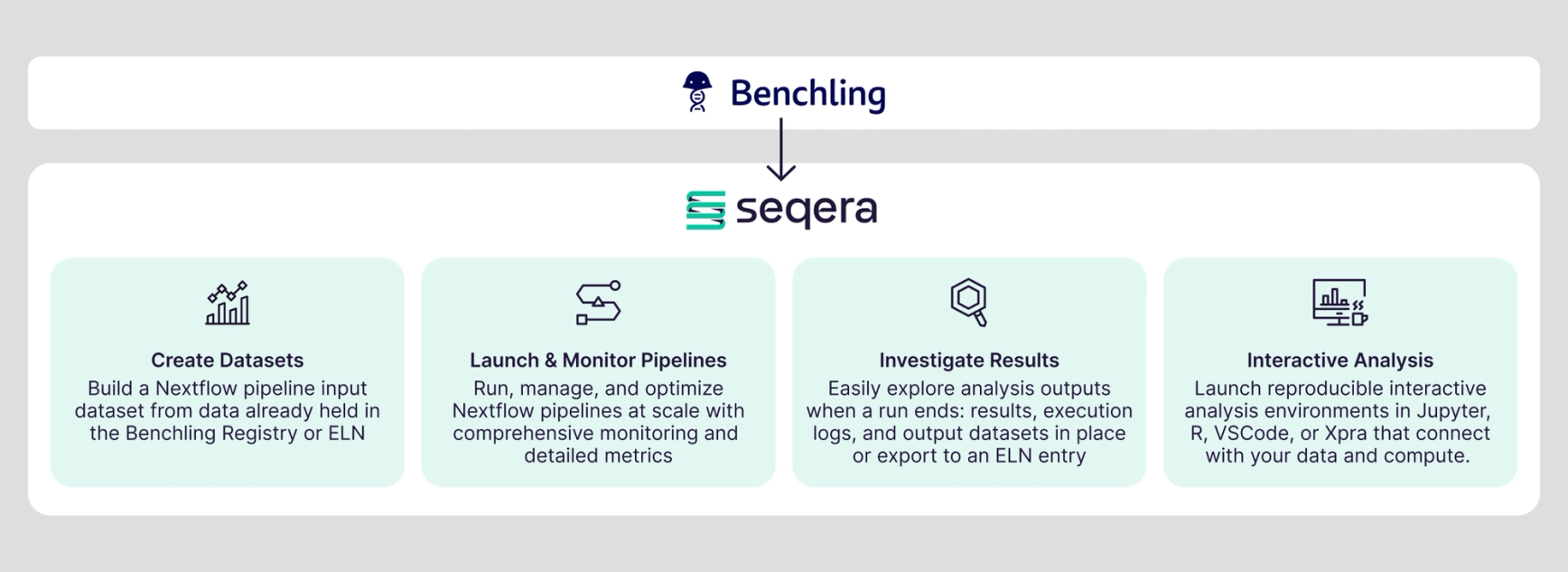
Pipeline launch and monitoring provides run management with detailed metrics. Results investigation lets you explore outputs, execution logs, and datasets in place or write them to a Benchling ELN entry. Interactive analysis adds and starts reproducible Jupyter, R, VSCode, or Xpra environments already connected to your data and provisioned compute resources.
One RNA-Seq plate, From Raw Sequences to Insights
Here is an example workflow for a single RNA-seq plate, from sequencing to analysis.
- At the bench. Sequencing finishes, and the sample sheet is already in the Benchling registry and ELN entry.
- In the AI assistant. The bench scientist asks the assistant to create a dataset in Seqera Platform from the sample sheet, then run nf-core/rnaseq on those samples, confirming the launch parameters before any resources are consumed.
- Back in the entry. The run URL link, status, and outputs land beside the samples they came from.
- Analyze results. The results can be mounted in an R-IDE or Jupyter Python Studio session or imported back into the Benchling ELN.
The launch happens in the AI assistant panel. The scientist names the Seqera organization and workspace, then request to launch nf-core/rnaseq with their chosen reference genome and any additional customized parameters. The AI assistant parses the request, confirms the launch configuration, and returns the Seqera Platform run metadata inside Benchling: the workflow run ID, pipeline revision, compute environment, and work directory.
The bench scientist doesn’t have to wait for the run to complete before starting an analysis. With the pipeline still running, they ask for a collaborative JupyterLab Studio in the same compute environment, with an 8-hour session lifespan and the results bucket mounted. The assistant creates and starts the Studio,returning its session ID, URL, container template, compute environment, and lifespan. The bench scientist opens the URL and starts working with their colleagues on the new outputs, with no files moved (no egress or ingress charges), and no new compute resources to manage.
Setting It Up: Three Steps, One Setup
Bench scientists don’t configure anything. An admin sets up the connection once:
- Register the Seqera MCP as a connector. A Benchling tenant admin adds the Seqera MCP endpoint to the AI Connectors toolkit and each user authenticates on-demand.
- Connect to your Seqera workspace. Point the connector at the workspace that holds the pipelines and compute environments the lab already uses.
- Decide who can launch. The permissions model follows defined Seqera Platform roles, so a user is limited to the same suite of actions via the connector.
For bioinformaticians, this means the pipelines, revisions, and compute environments you already maintain stay the source of truth. The connector exposes them to the bench science team. It does not duplicate them.
Security and Governance: Data Remains In-situ
Every action is governed by Seqera's existing security model: access, permissions, and audits.
- →Your compute, your storage. Pipelines run on the lab's own compute and write results to the lab's own storage.
- →Your permissions. Every action runs as the person who requested it, under their existing role permissions, and is logged.
- →Your record. The run, its parameters, and its outputs are recorded against the Benchling ELN entry.
Pipeline results connect back to the samples, the metadata, and the people that generated them. No silos, just data at your fingertips.