
What's New in Nextflow 26.10: Type Checking, Workflow Modules, Pipeline Composition, Agent Primitive
We're thrilled to announce the release of Nextflow 26.10. This release is the culmination of the language work we've been delivering over the past year. Static typing is now stable, and type errors are caught by nextflow lint and nextflow run before a single task is submitted. Workflows can now be shared through the Nextflow Registry. Entire pipelines can be composed directly in Nextflow. A new agent skill assists with code migrations, and an experimental agent primitive brings AI agents into your pipelines as first-class components. Rounding things out is a set of quality of life improvements across the CLI and VS Code.
Nextflow 25.10 introduced workflow params and outputs. Nextflow 26.04 brought records and static typing. Nextflow 26.10 completes the picture: workflow params, workflow outputs, record types, and static typing come together to make pipelines composable, reusable building blocks.
These features make Nextflow code easier to write and verify, whether you're doing it yourself or with an AI agent. Typed inputs and outputs give humans and agents the ability to verify their work via static type checking. The new migration skill puts this into practice: an agent can migrate your pipeline to static typing and iterate with nextflow lint until it lints clean.
Type Checking
Read the documentationStatic Typing is Stable
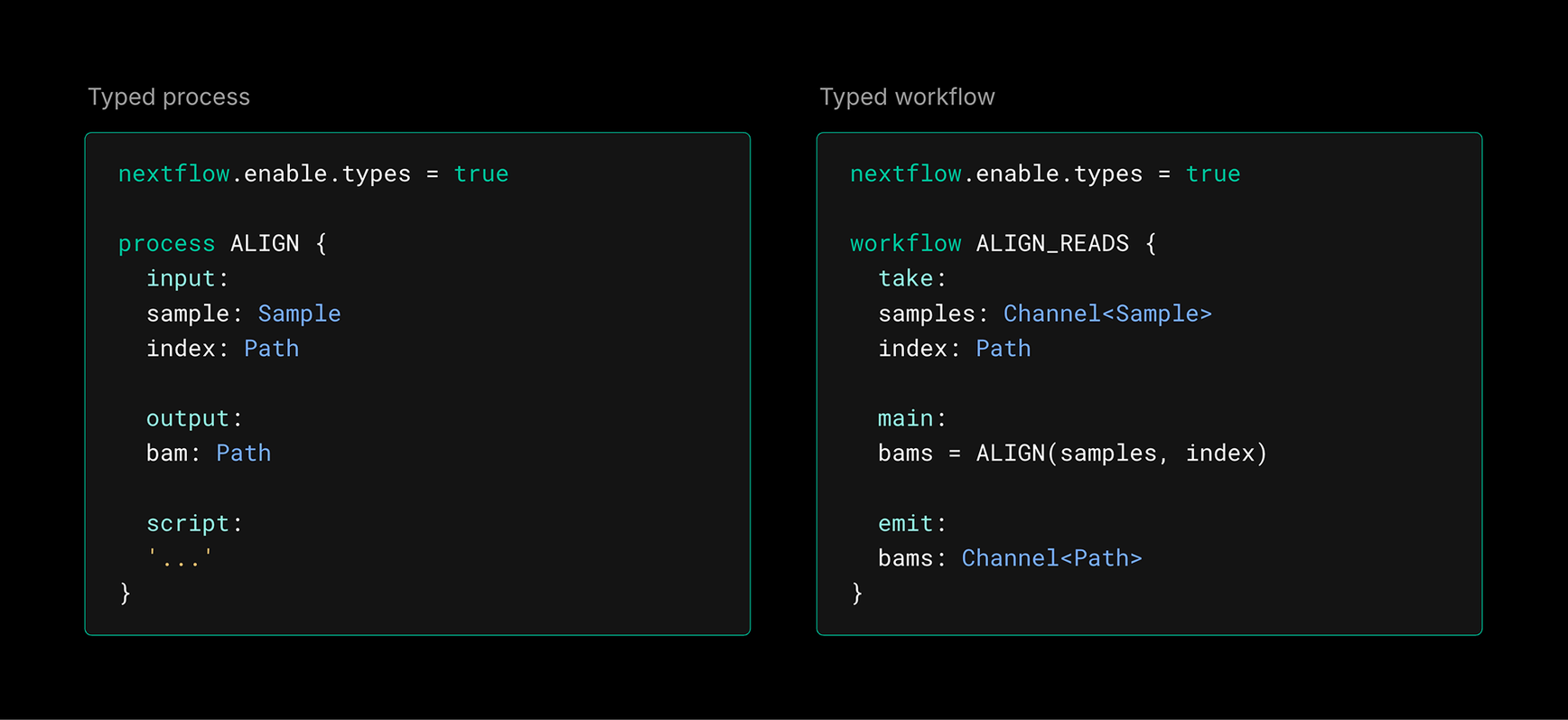
Static typing has been in preview since Nextflow 25.10, with records and typed workflows arriving in 26.04. With Nextflow 26.10, static typing is now stable and ready for production pipelines. Static typing is still enabled one script at a time using the nextflow.enable.types feature flag. Existing code runs unchanged, so you can adopt it gradually at your own pace:
Type checking in the CLI
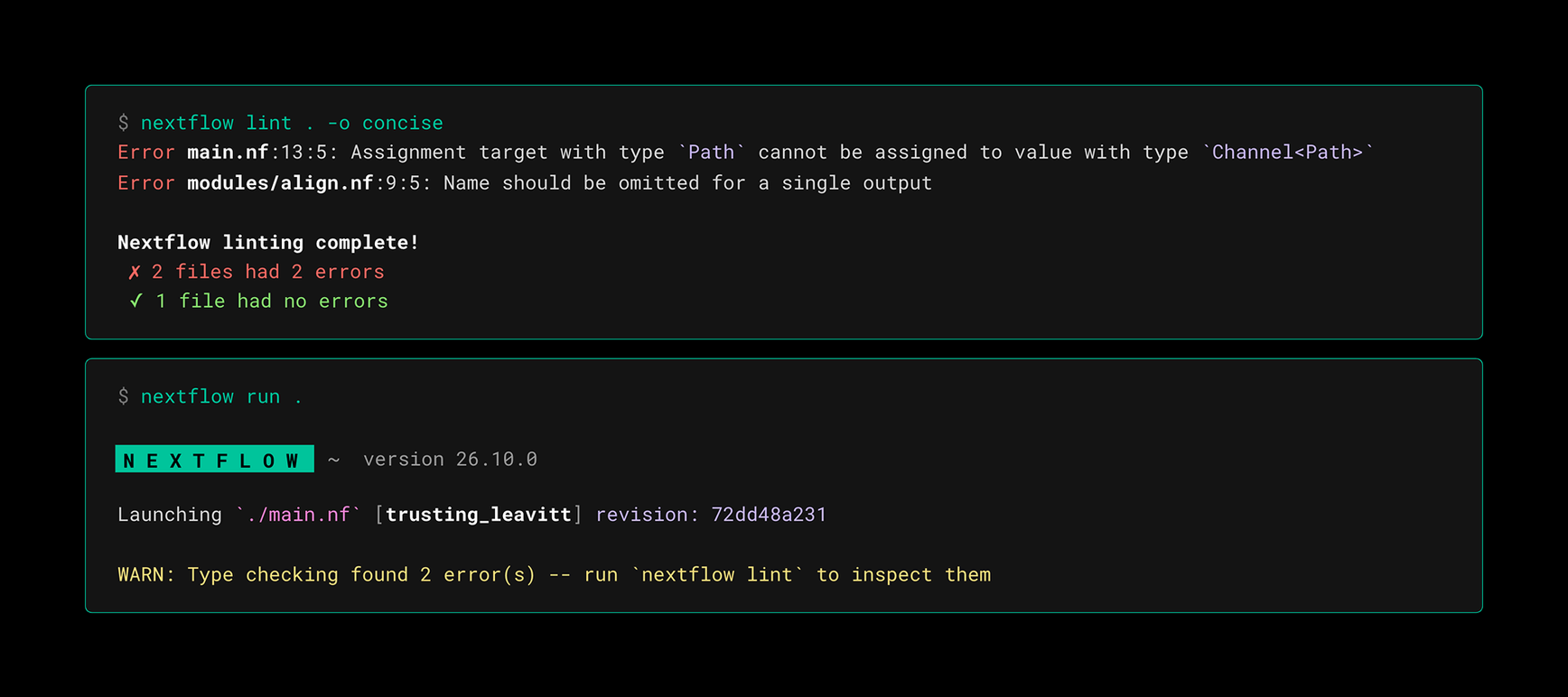
In Nextflow 26.04, type checking was only performed by the language server in your code editor. Nextflow 26.10 brings type checking to the command line. Use nextflow lint to catch type errors before you run your pipeline. nextflow run also checks types, but it only reports type errors as warnings and doesn't stop execution. To make sure type errors are caught before anything is submitted to an executor, run nextflow lint first, for example as a step in your CI.
Migrate Code with Agents
Get the migration skill
Migrating an existing pipeline to static typing by hand is slow and error-prone. To make this easier, we've released the migrate-nextflow-code skill in the nextflow-io/agent-skills repository.
Install the skill, ask your agent for the migration, and it takes care of the rest. The skill sweeps your pipeline code, migrates it while following best practices, then iterates with nextflow lint until everything is clean. It can be installed for Claude Code, Codex, Cursor, and other agents.
The skill covers more than static typing. It also handles:
- →Strict syntax: updating any code that doesn't comply with
nextflow lint - →Topic channels: migrating to topic channels where appropriate
- →Workflow outputs: replacing
publishDirwith theoutputblock
Workflow Modules
Explore the Nextflow Registry
Nextflow 26.04 introduced a module system for sharing processes through the Nextflow Registry. Nextflow 26.10 extends it to workflow modules (subworkflows), so anyone can publish reusable workflows to the public registry.
Workflow modules
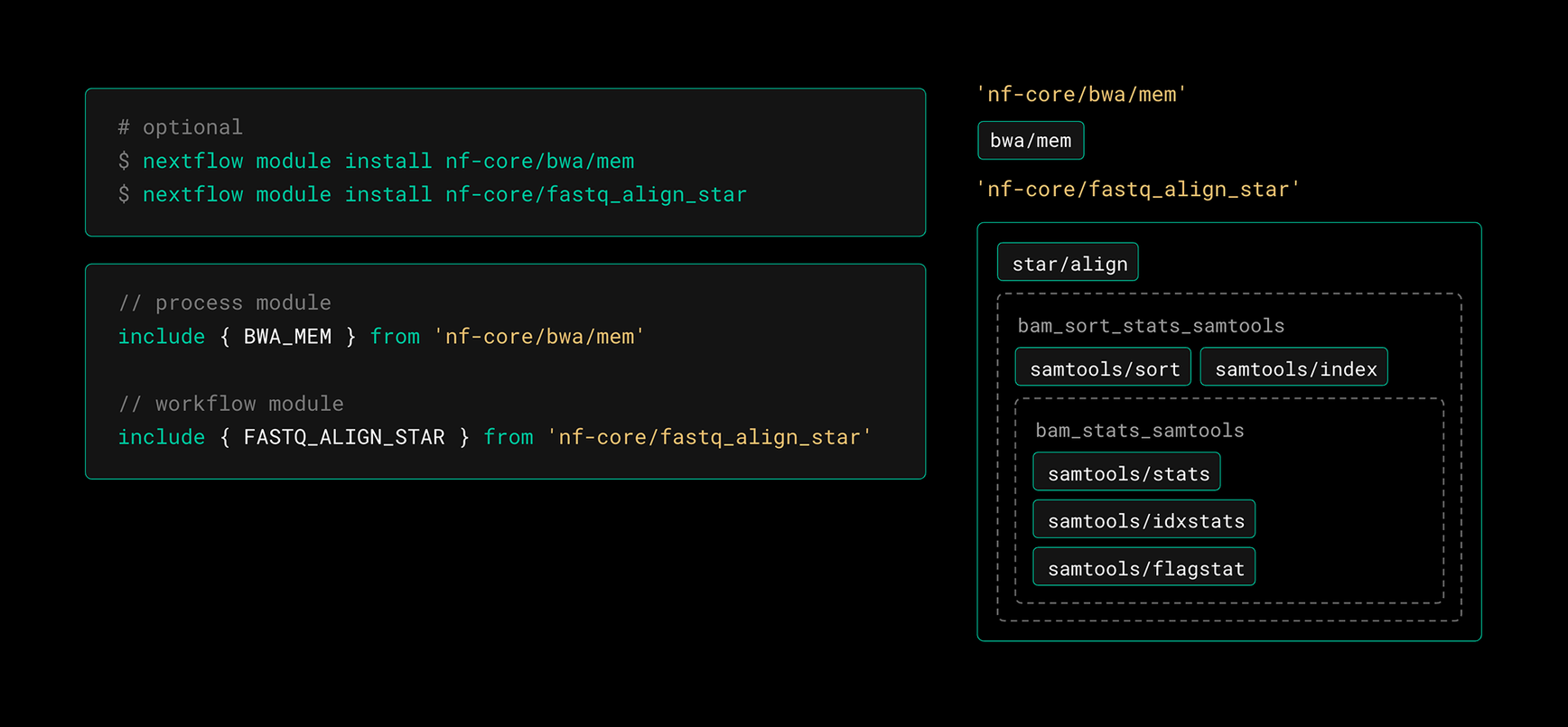
Workflow modules use the same registry, the same nextflow module CLI, and the same include syntax as process modules. Including a workflow looks exactly like including a process:
Module dependencies
Each workflow module declares its own dependencies in its module spec. On install, those dependencies are vendored under the workflow module's own modules directory. This means two workflow modules can depend on different versions of the same module without conflict. You don’t have to negotiate a single shared version across your pipeline anymore.
The above example shows the module directory tree after installing a process module (nf-core/bwa/mem) and a workflow module (nf-core/fastq_align_star). The workflow module has its own modules directory and does not depend on any sibling modules.
Workflow module execution
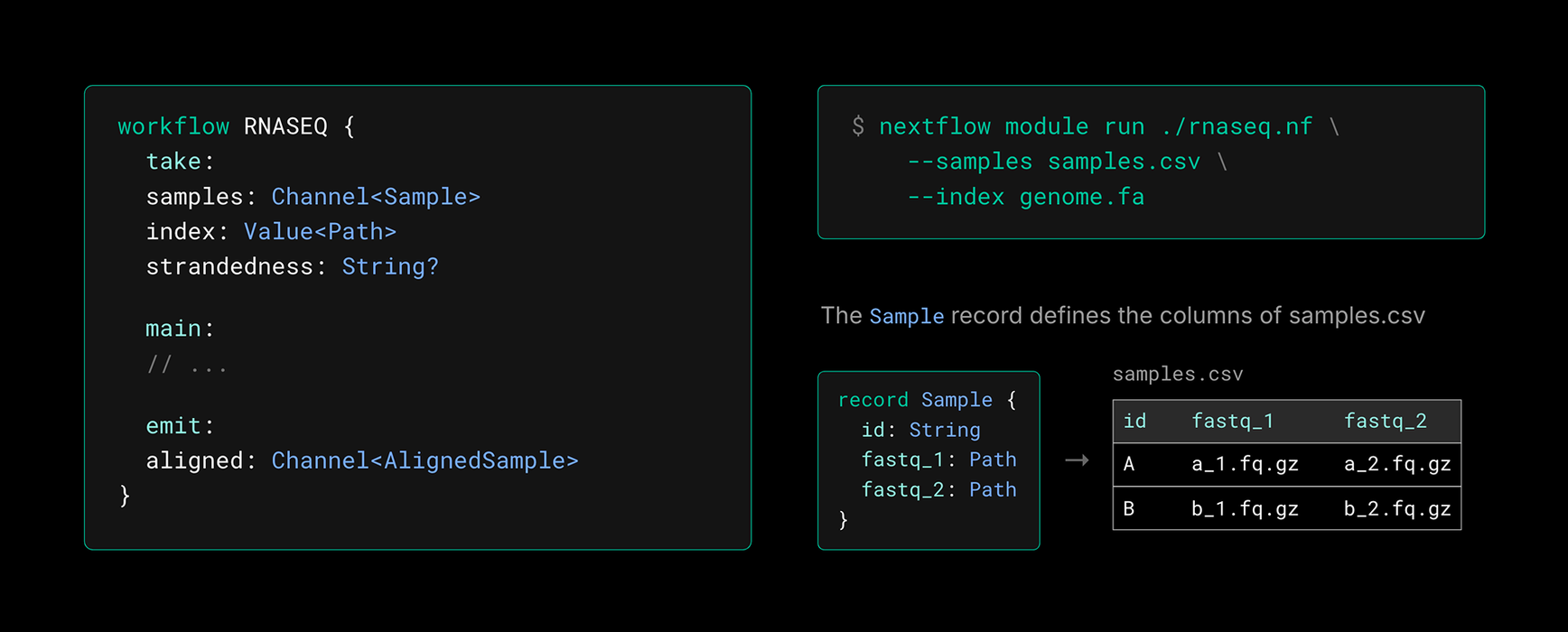
A typed workflow module can be run directly with nextflow module run. Every input becomes a param of the same name, and its declared type determines how the value is read. In this example, the CSV is automatically loaded as a channel of Sample records and the FASTA is loaded as a dataflow value. Every emit is reported as a workflow output. No need to write a wrapper pipeline just to exercise a module.
Pipeline Composition
Read the documentation
Until now, the only way to use a pipeline was to run it directly with nextflow run. Pipelines couldn't be combined like processes and workflows. Chaining pipelines together meant shell scripts, Nextflow-in-Nextflow, or an external workflow manager. Each pipeline had to finish before the next could start. The glue code between two pipelines had nowhere to live, so it had to be crammed into one pipeline or the other. The only alternative was copying and maintaining pipeline code in a fork.
Nextflow 26.10 introduces pipeline composition: a new way to create pipelines of pipelines (meta-pipelines) directly in Nextflow. Pipeline composition is the capstone in a sequence spanning the last few releases: strict syntax, workflow params and outputs, record types, and static typing. All of these things make Nextflow pipelines easier to read, write, and validate; when put together, they make pipelines composable.
Every pipeline that uses static typing and the params / output blocks is now a callable workflow:
- →The
paramsblock becomes thetakesection - →The
outputblock becomes theemitsection - →The include alias is the workflow name
In other words, a modern pipeline can be called as easily as it can be run. Include it with the workflow keyword and call it by name with a params record
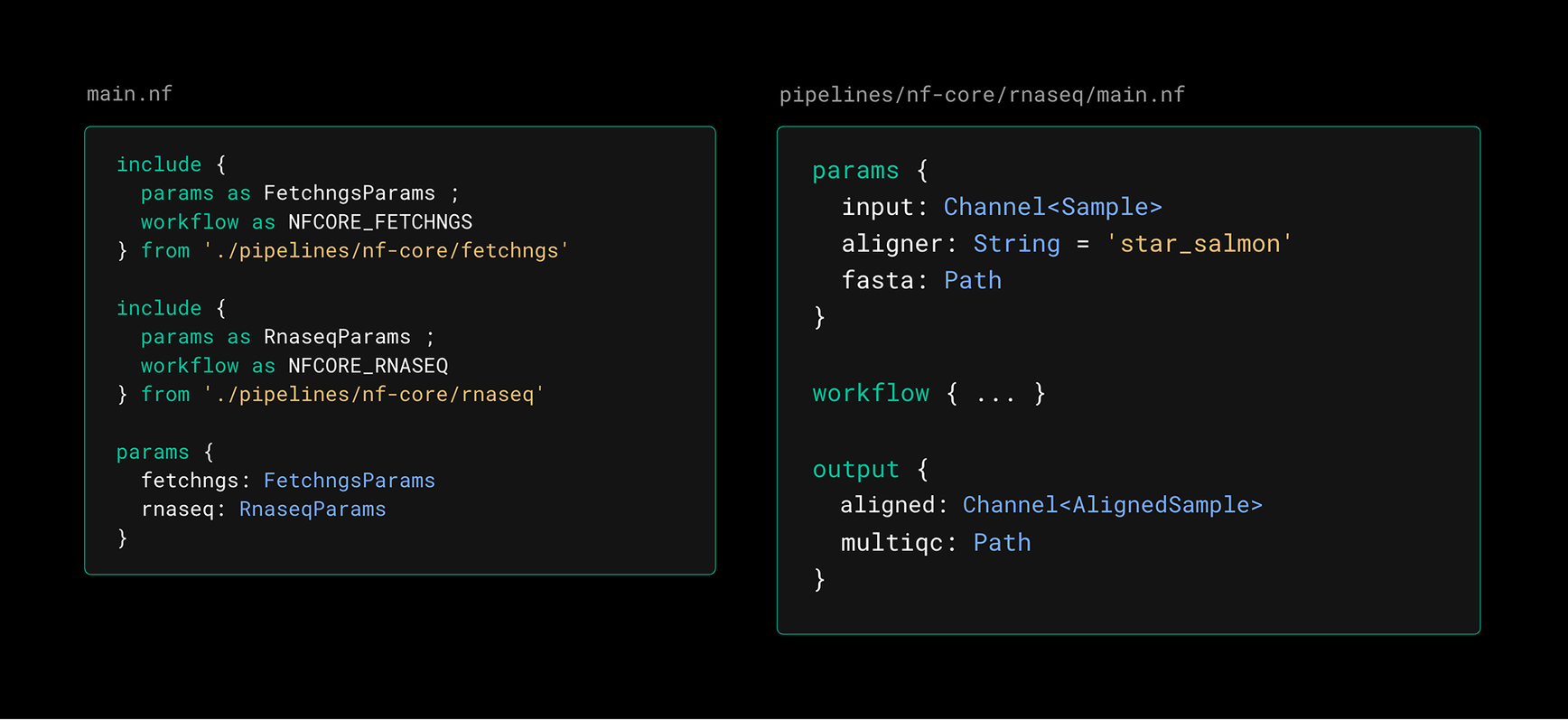
Included pipelines run in the same session, DAG, and work directory as the parent. Each pipeline can take and emit channels, so that each sample is immediately processed by the next pipeline as it is emitted. No samplesheet hand-offs, and no waiting for one pipeline to finish before the next begins.
Agent Primitive (Preview)
Read the Agentic Nextflow blog
Nextflow 26.10 introduces an experimental agent primitive, a new way to bring AI agents into your pipelines as first-class components. It is a process-like syntax for defining agentic tasks. Agents have their own directives, such as model, skills, and tools. They have typed inputs and outputs. Where processes have a script, agents have a prompt.
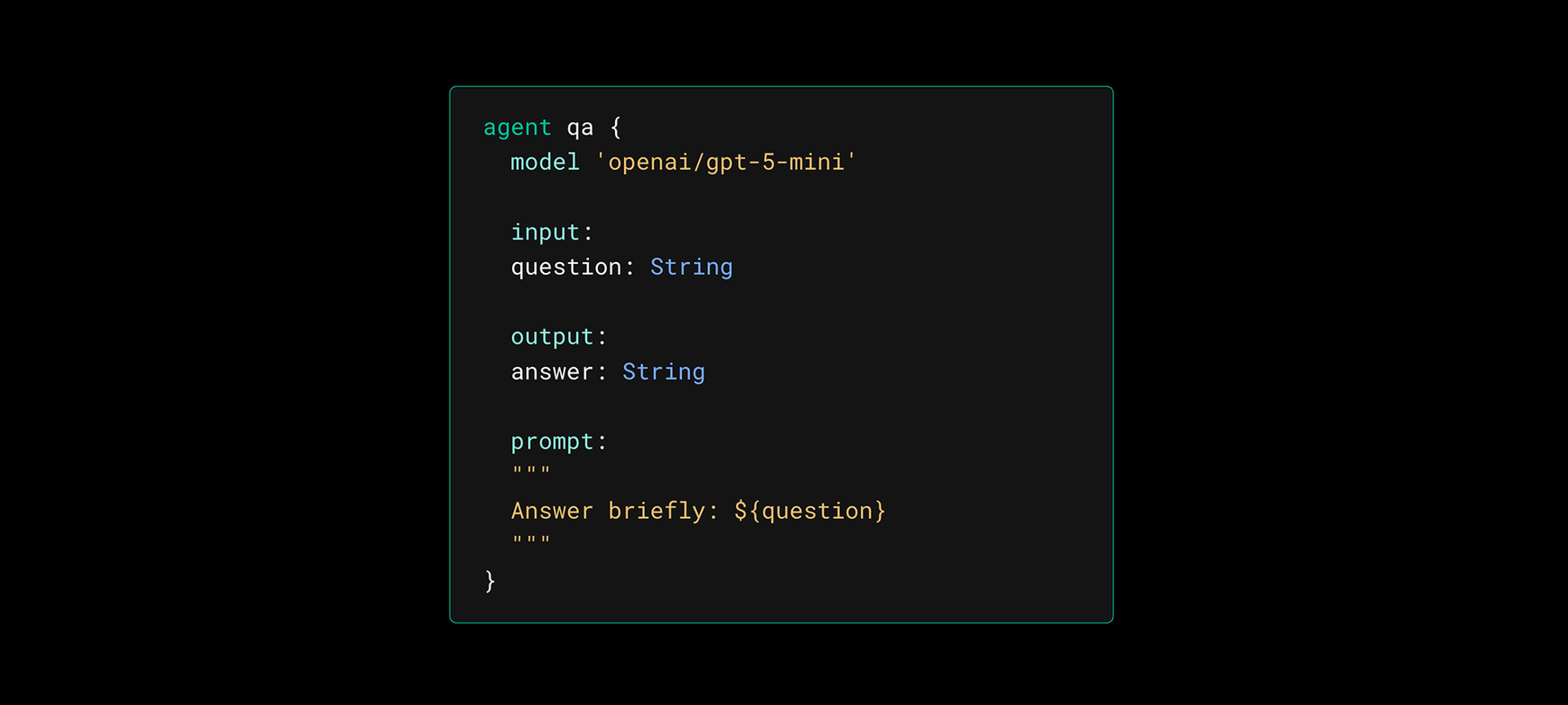
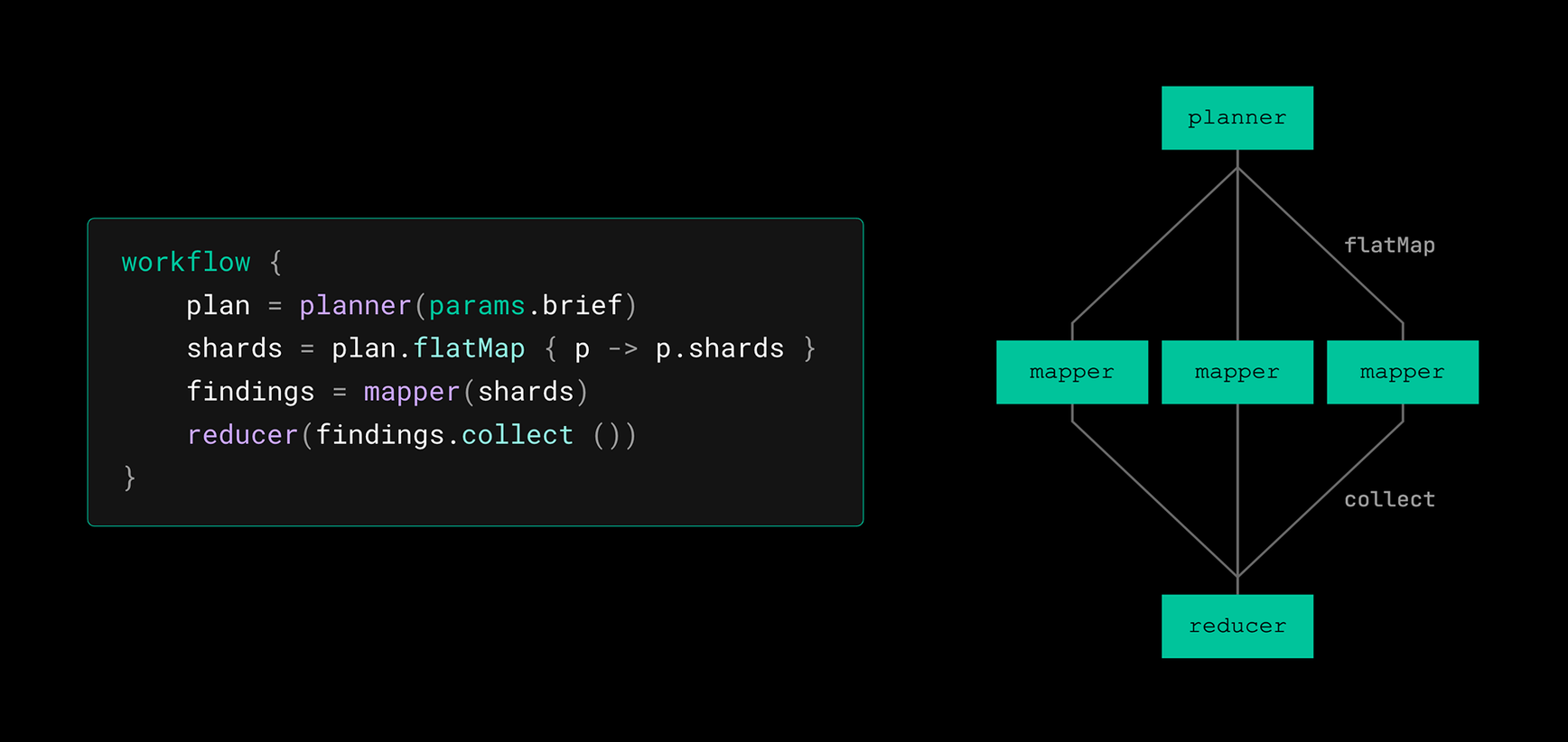
Agents can be composed with channels and operators, just like processes. Agent runs get the same benefits as every Nextflow task: isolation, error handling, caching, and portability. Every agent run is recorded in lineage with the configuration that shaped it and the result that it produced.
Quality of Life
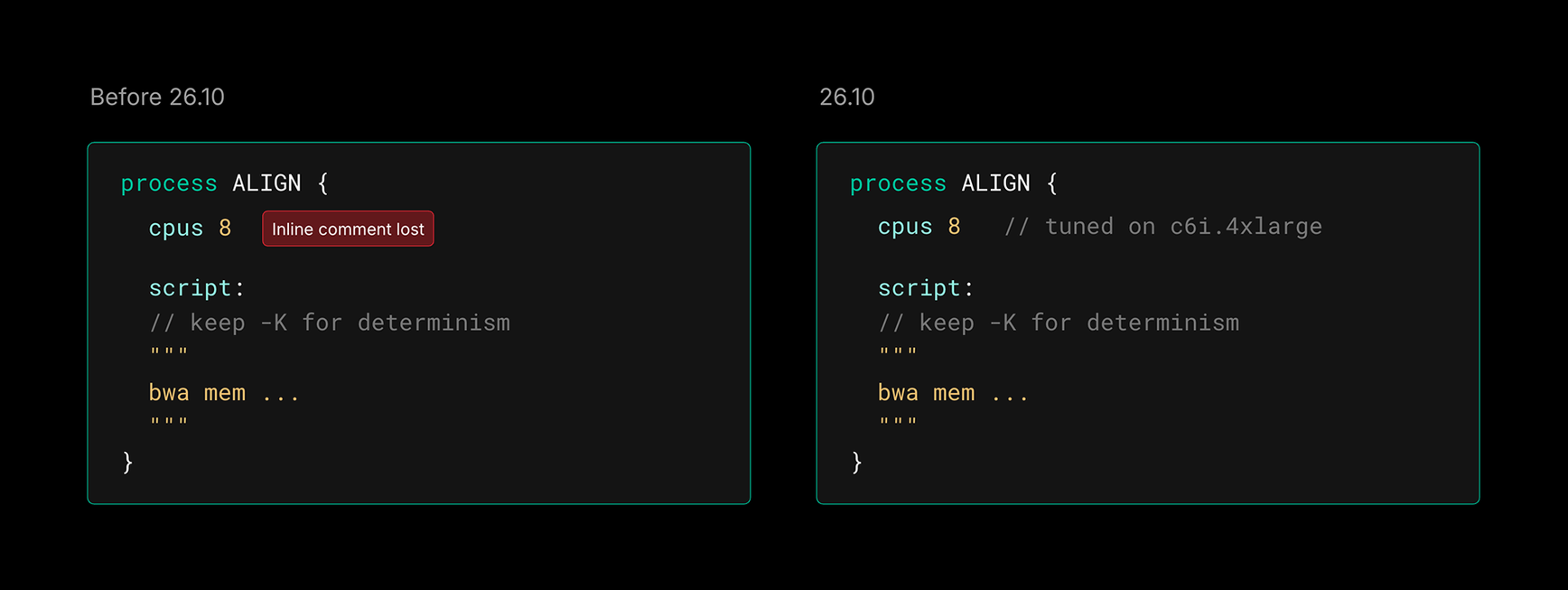
The formatter preserves comments
The formatter used to drop comments outside a handful of specific positions, making it difficult to use with real code. Every comment is now preserved during formatting. It might be moved depending on where you place it, but it will not be lost.
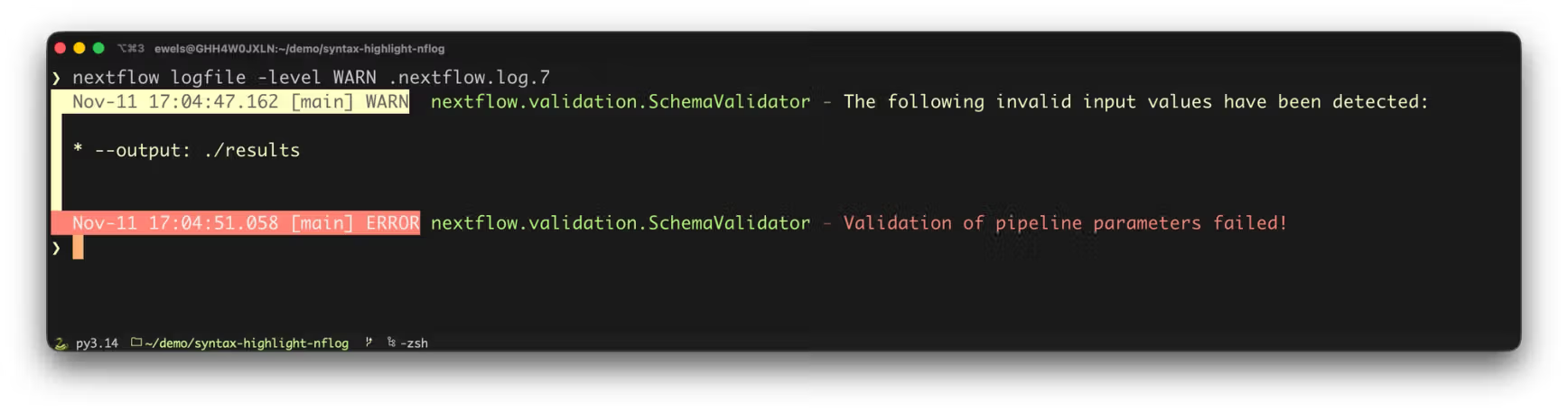
nextflow logfile
The nextflow logfile command provides a friendlier way to search your log files. No more scrolling through .nextflow.log files by hand, or guessing which one belongs to which run. Select logs by run name or session id. Filter log lines by severity level. Follow the log of a live run.
GPU support for local executor
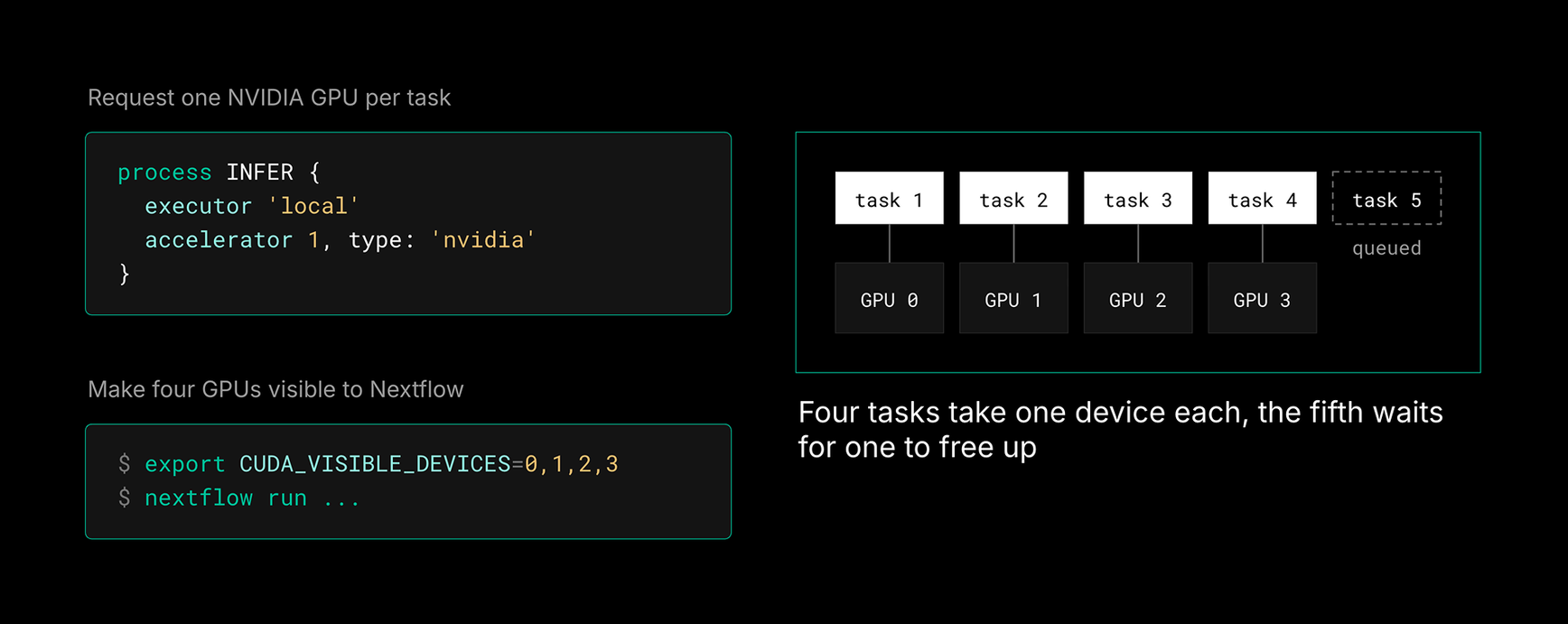
The local executor now supports the accelerator directive, making it ideal for running Nextflow pipelines on a single machine with multiple GPUs (e.g. an NVIDIA DGX). Specify the list of devices with CUDA_VISIBLE_DEVICES or equivalent environment variable, and Nextflow will assign GPUs to tasks based on requests and availability.
VS Code extension
The latest version of the Nextflow VS Code extension is packed with several new goodies:
- →A new process config viewer lets you preview the resolved config for a process call, with additional controls for toggling profiles and filtering.
- →A new log file viewer lets you browse run logs directly in the editor, complementing the
nextflow logfilecommand. - →Process scripts are highlighted in their own language. Supports Bash, Python, and R.
- →The DAG preview now supports pan and zoom, making large pipelines easier to navigate.
Get Involved
We hope that you're as excited about Nextflow 26.10 and pipeline composition as we are! As a community-driven project, we'd love for you to get involved:
- →Nextflow 26.10: Update to the latest release with nextflow self-update and read the migration guide for Nextflow 26.10
- →Adopt static typing: Static typing is stable and ready to use. Read the documentation
- →Share workflow modules: Publish your subworkflows to the registry. Explore the Nextflow Registry
- →Migrate with agents: Let an agent help you migrate your pipelines to the latest syntax. Get the migrate-nextflow-code skill
- →Compose your pipelines: Build your first meta-pipeline. Explore the pipeline composition example
- →Try the agent primitive: Read the agent primitive blog post